
2) Editing your Home page

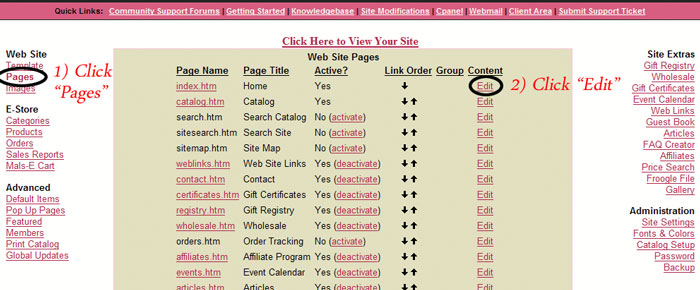
1) In your Store Admin, click on "Pages".
2) Next to index.htm click "Edit"
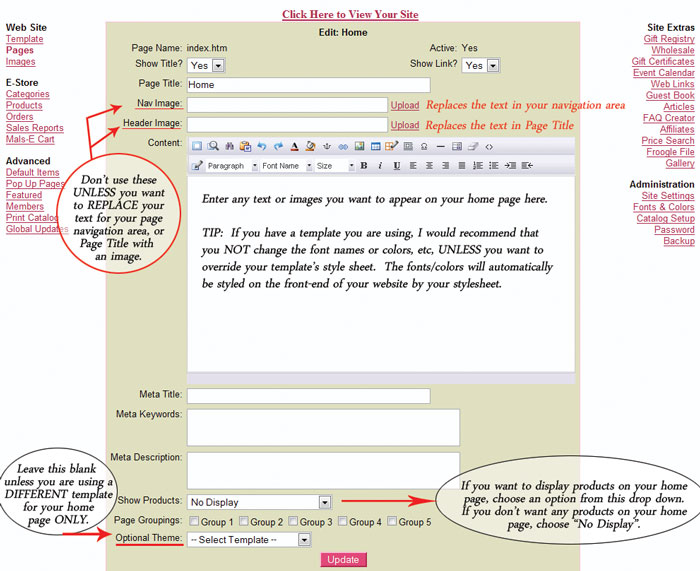
3) Fill in the description area and enter any text or images you wish to use.
Tip #1 - If you do not wish to display the page title "Home" on your home page, choose "Show Title - No".
Tip #2 - If you do NOT wish to display any products on your home page, at the very bottom, change the drop down box next to Show Products from "New Items" to "No Display".

 

  • 18 Users Found This Useful
Was this answer helpful?

Related Articles

6) Adding Products

To add your products, follow these basic steps: Click on "Products" (left side under...

Pages - Adding and Editing Page Content

To change the text or content on a current page: Within your Store Admin, click "Pages" On...

4) Adding Pages

To ADD a page: Within your Store Admin, click "Pages" At the bottom of the screen, click "Add...